
Navigation
Navigation around the application is the same from all screens, with a toolbar at the top of the window. The library selection can also be filtered from the button on the left of the window.
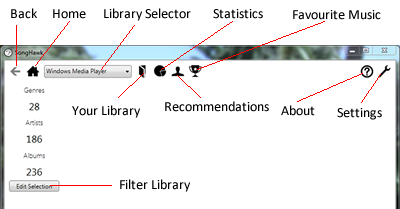
The available options from the toolbar are as follows:
- Back: Go back to the previous screen that you were on.
- Home: Go back to the main screen of the application.
- Library Selector: Select which library plugin to use.
- Your Library: View information about the contents of your library.
- Statistics: Find statistics about the contents of your library.
- Recommmendations: Find recommended artists based on your existing library.
- Your Favourite Music: Find the top ranked genres, artists and albums from your library.
- About: View details about the application, including a link to this site.
- Options: View the different options that are available.
- Filter Library: Change the parts of the library that are considered by the application.